How to boost post on Facebook account is a familiar choice for many businesses looking to quickly increase reach and engagement for existing content. Instead of creating a complex campaign, this format allows you to directly leverage posts that are performing well on your fanpage, thereby saving setup time and making the budget easier to control. However, to achieve real effectiveness, you need to clearly understand who you are advertising to, whether the objective is engagement, messaging, or driving traffic, and what a suitable budget is for a specific duration. If you only click “Boost Post” based on intuition, results often stop at having many likes but little business value. Conversely, when you identify the right audience, placements, and clear call-to-action content, how to boost post on Facebook account can still yield steady leads, messages, and orders, especially for small businesses or local services.
Reasons why boosting posts Facebook is attractive
Boosting a post is attractive primarily because Meta intentionally designed this feature toward maximum minimalism. Immediately after you post, the “Boost post” button appears prominently, creating the impression that this is the fastest and easiest way to advertise.
Users do not need to access Ads Manager, understand campaign structures, or set up multiple technical steps. Simply choose a budget, select a duration, and confirm to start the ad distribution.
For many small business owners, especially non-marketing professionals, this simplicity hits the mark: the post is seen by more people, engagement increases rapidly, and the brand feels “promoted.” In certain situations, boosting can truly help increase coverage and generate initial social signals.
Risks of boosting posts without a strategy
The problem lies in the fact that boosting is often used as an emotional action, unlinked to specific business goals. Without a clear Meta Ads strategy, the ad budget is mainly used to buy “vanity metrics” such as likes, comments, or a few low-quality clicks.
While these numbers look impressive, they do not reflect the ability to generate potential customers or revenue. This is the biggest “trap” of boosting: you pay for short-term attention instead of building an advertising system that serves long-term growth.
Is boosting posts still as “useless” as before?
It is important to objectively recognize that the boosting feature has been significantly improved by Meta in recent years. If boosting previously revolved almost exclusively around increasing reach and engagement, users now have more choices regarding objectives, audiences, and basic measurement metrics. This shows that boosting is not entirely an ineffective tool. In specific cases, it can still be effective if set up correctly and used for the right purpose.
Factors determining effectiveness when boosting
The key point is not whether boosting is “good” or “bad,” but how you use it. You need to clearly understand your business goals—what settings are truly important and what are merely formal metrics.
When boosting is placed within an overall advertising strategy with a clear conversion orientation, it can become an effective supporting tool. Conversely, if you only chase attractive numbers, boosting can easily become a cost that brings no real value.
Optimizing post ads for superior engagement performance
In the growth roadmap of a business on the Facebook platform, the boost button is often the first touchpoint for owners wanting to expand their reach. However, rather than a simple button press, setting up this campaign requires strategic thinking about objectives and audiences to ensure every dollar spent brings actual value.

Step 1: Define campaign objectives
Immediately after clicking the “Boost Post” button, the first screen that appears is the objective setup section. This is the most crucial step because it shapes how the Facebook algorithm will distribute your post.
While in the past, Boosting a post was mainly used to increase Likes, the modern 2026 interface has introduced smarter options. When you click the “Change” button, the system will provide specific options based on actual needs:
- Get more messages: Suitable for closing orders directly via Messenger or Instagram.
- Get more engagement: Focus on Likes, Comments, and Shares to create a crowd effect and increase awareness.
- Get more leads: Creates a form directly on the post to collect customer data.
- Get more calls: Encourages customers to call the business hotline directly.
- Get more website visitors: Drives users to your Website, where you can use the Facebook Pixel for later retargeting.
Step 2: Set up contact forms and lead management
If your objective is to collect information (Get more leads), Facebook will require you to create a contact form. Here, you have the right to customize the form name, required data fields such as Full Name, Email, Phone Number, and especially screening questions.
Oriented questions such as “How soon do you plan to renovate your house?” or “What is your estimated budget?” will help you categorize who are customers in urgent need and who are just browsing for reference.
A crucial note is the response speed: data flowing from the Form needs to be processed immediately through the Leads Center in Business Suite or automated CRM systems. In advertising, a “Lead” is an asset with short-term value; if you do not call back immediately, the possibility of losing the customer is extremely high.
Step 3: Optimize creative and CTA buttons
Next, you will encounter the Advantage+ Creative feature. This is an AI tool that automatically transforms your images or text to increase engagement. However, according to in-depth experience, professional advertisers often disable this feature to maintain full control over the message, avoiding instances where the AI creates display versions that do not align with the brand identity.
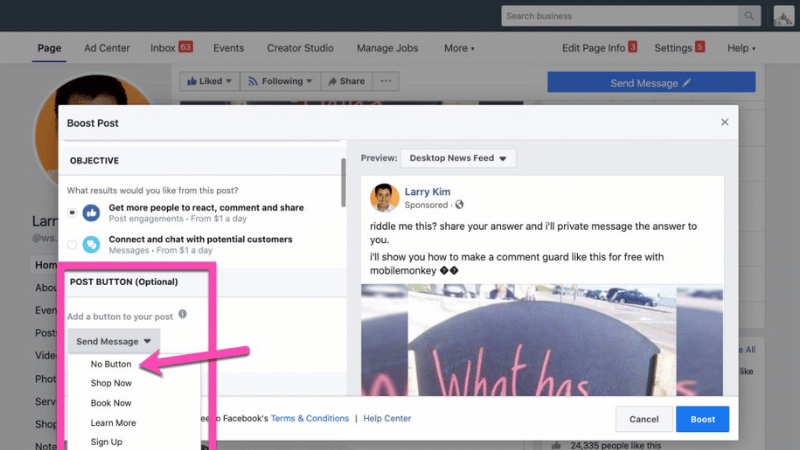
You can choose “Send Message,” “Call Now,” or even “No Button.” Not using a CTA button is a subtle “stealth” tactic, helping the ad look like an organic post from a user on the Newsfeed, thereby reducing the customer’s psychological defense barriers and encouraging them to interact most naturally.
Step 4: Target audience segmentation
This is the most critical part of the process. You must click the pencil icon to personalize the customer segment:
- Demographics: Select the exact age, gender, and geographic area within a suitable radius.
- Interests and Behaviors: Dive deep into customer habits (e.g., “Fitness & Wellness” for a gym service).
- Custom Audiences: Reuse lists of people who have liked your page or similar lookalike audiences.
Step 5: Balancing budget and forecasting delivery performance
After completing the targeting, Facebook will display an estimated daily reach and expected engagement based on the budget you set.
For example, with a spend of $23/day over 7 days, you will see the minimum and maximum scale the post can reach. At this step, you can fully adjust the budget slider to fit your financial capacity before officially launching the campaign.
The how to boost post on Facebook account method is an excellent tool for creating a quick effect and increasing instant engagement to help businesses begin their customer acquisition journey. However, to achieve long-term growth and in-depth data control, you should gradually transition to using Ads Manager in Business Suite. That is where you can build professional advertising funnels, save costs, and optimize actual profits.
Frequently Asked Questions
Possibly. If you repeatedly boost the same post to the same small audience, your Frequency will rise. When users see an ad more than 3-4 times without interacting, Facebook marks it as “boring” and automatically pushes the CPM higher as a penalty. To fix this, change images or content every 7-10 days.
There are 3 common technical reasons: First, the post contains images that violate policies (excessive skin, music copyright, or sensitive Before/After images). Second, your page has an outstanding advertising debt. Third, the post is in a format that is not supported for advertising (for example, sharing a link from a private group or a post with multiple mixed formats). You need to check the Page Quality in Business Suite to know the specific reason.


