The notification line for billing card not usable Facebook Ads often appears very unexpectedly, causing many campaigns that were running stably to stop immediately. This error not only affects the ad delivery progress but also carries the risk of data disruption, resetting the learning phase, and distorting the entire budget plan. In reality, the cause can come from many sides, such as the issuing bank, spending limits, security verification, or changes in payment policies from Meta. If not handled correctly, the ad account can easily fall into a state of prolonged payment restriction. Therefore, clearly understanding the nature of the error and applying the correct resolution will help you restore ads faster and minimize negative impacts on performance. In many cases, a billing card not usable Facebook Ads can be completely fixed in a short time if the right bottlenecks are checked.
Common causes for billing card rejection
In practice, when running Facebook Ads, payment errors are not uncommon and do not typically stem from a single cause. In many cases, an account was running normally before, but a single change to the payment method causes ads to stop immediately.
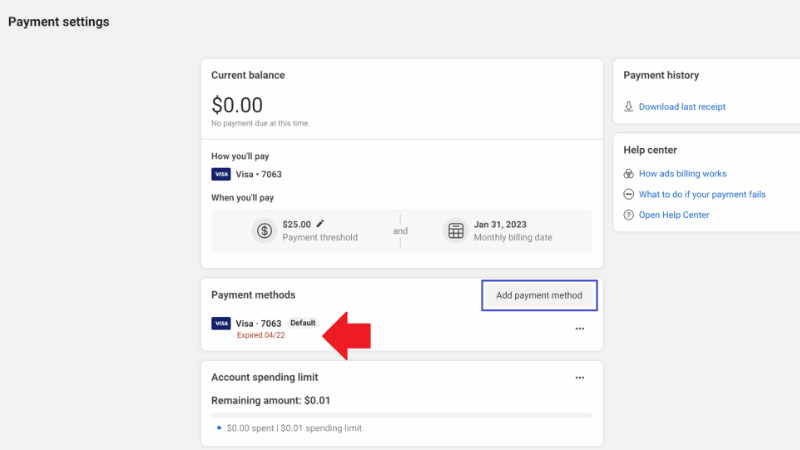
Expired billing card
One of the most basic errors is an expired billing card. In the Billing section, Facebook will display an “expired” status right under the payment method. This means every attempt to deduct money from that card fails. When you continue running ads with an expired card, the system will automatically reject the payment and stop delivery.
Incorrect steps when adding and removing payment methods
When entering the Billing & Payment section in the ad account, many people have the habit of clicking the three dots to delete the old card immediately. Facebook designed this flow to reduce the risk of interrupted payments. If you perform the steps in the wrong order, the system may record that the account was once in a state of “no valid payment method,” which directly affects the ad account trust.
Mismatch between prepaid and postpaid payment types
Another cause comes from using a postpaid payment method that is unsuitable for the region. For markets like the US, Canada, or most of Europe, postpaid payments still operate stably. However, in many other countries, especially some African nations, postpaid cards frequently encounter errors and are easily rejected.
In these cases, a prepaid payment method is safer. When using prepaid, you proactively top up funds using the Add Fund button; Facebook only distributes ads within the available balance, thereby limiting the risk of incurring debt and having the account locked.
Facebook automatically switches accounts to postpaid
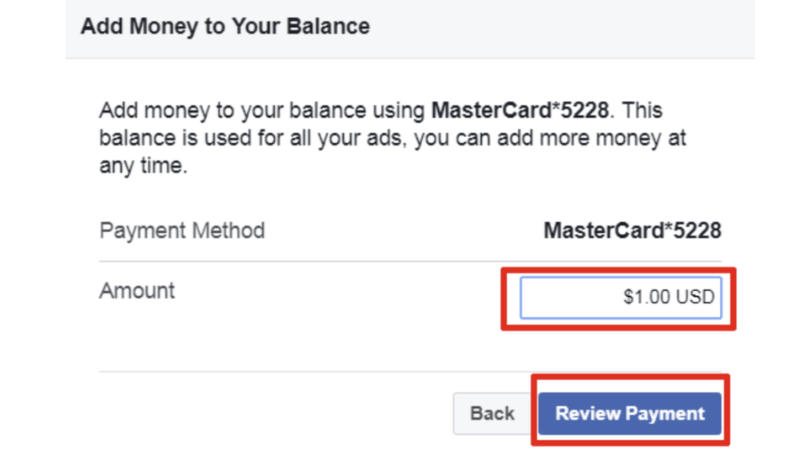
When you use a debit or credit card, Facebook may automatically switch the account from prepaid to postpaid without you noticing. At this point, ads still run normally because Facebook has not deducted money yet.
But by the billing cycle, if the payment deduction fails multiple times, the account will be restricted or disabled due to a fee debt. This is why many people are suddenly locked out of their accounts despite not making any recent edits. The essence lies not in the ads, but in the system failing to collect money on time.
Account disabling due to prolonged payment errors
At a more serious level, payment errors can lead to the ad account or even the business account being disabled. When encountering this situation, the first step is to check the scope of the impact: whether the error applies only to the ad account or has spread to the business.
Usually, Facebook will request identity verification or demand payment for outstanding debt. Many cases stem from Facebook trying to deduct money from the card multiple times but failing, and after several unsuccessful attempts, the system automatically locks the account to reduce financial risk.
Account trust affected by interrupted payments
Facebook allows you to add multiple parallel payment methods for a reason; the goal is to ensure that fee collection is not interrupted. If the account frequently encounters payment errors, is rejected multiple times, or changes methods constantly, the system will evaluate the account as having low trust.
Once labeled as high-risk, the account will face more restrictions in the future, from reduced spending thresholds to the risk of being disabled. Therefore, correctly understanding the cause of the card error and handling it properly from the start is a vital factor for long-term Facebook Ads operation.
The card is blocked for international transactions by the bank or the payment gateway
The billing card is blocked by the bank for international or online transactions, while Facebook Ads are processed as an automatic international payment. Many cards still swipe or perform domestic transfers normally, so users mistakenly think there is no problem with the card, but in reality, Facebook cannot deduct money.
This case often happens when:
- The card has not enabled international payment or e-commerce functions.
- The bank automatically locks transactions due to suspected risk (especially when ad spend spikes, for example, from $20–$30/day to $200–$300/day).
- The card is newly issued, but not fully authenticated, or lacks transaction history.
7 Methods to quickly resolve Facebook Ads payment errors
Payment disruption not only stops effective ad campaigns but also directly drags down the account’s reputation score in Meta’s eyes. When the system reports a card error, advertisers need a standard troubleshooting process to both restore delivery and avoid being flagged by the algorithm for unusual activity.
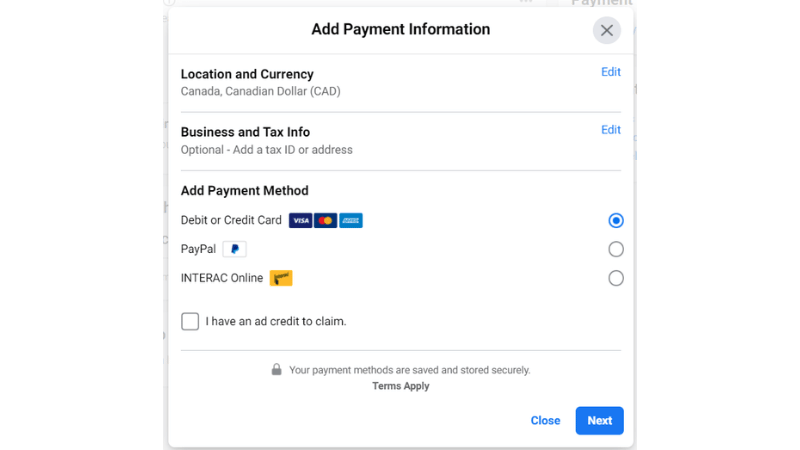
Update and replace expired payment methods
The safest process is to add a new card before deleting the old one. For advertisers in international markets like Nigeria, expert advice is to prioritize using USD-denominated cards instead of local currency (like Naira) to avoid exchange rate conflicts.
In more stable regions like the US or Canada, you can confidently use domestic cards. After the new card is confirmed by the system, delete the old card; at this point, Facebook will automatically set the new method as the default, helping the cash flow be restored without shocking the financial management system.
Process for adding and removing payment methods
Click on Add payment method, and complete the OTP/3D-Secure verification steps so the new card is fully accepted. Carefully check if the new card status is displayed as “Primary.” Only when the cash flow has a new anchor should you proceed to remove the old card. Compliance with this order helps the account always maintain a continuous active state.
Manage funding sources for prepaid and postpaid accounts
Depending on the type of account you own, the approach will differ. The first and most important step is to accurately cross-check the current outstanding balance and pay it in full to clean up the financial history. With prepaid accounts, you have more flexible options like Mastercard or bank transfer.
However, in some specific markets, the USSD method is rated as the fastest and least error-prone. You just need to select USSD, enter the amount, select the representative bank, and execute the command code on your phone. Money will be added to the ad account almost instantly after you confirm via email or banking app.
Prevent and handle automatic account type conversion
During some system updates, Facebook may automatically change the account’s payment mechanism to postpaid, confusing budget control. To handle this, you need to review the region and timezone settings from the start.
If you detect this change, quickly top up a seed fund or pay outstanding invoices immediately. This helps the system record that you are still in good control of the cash flow and minimizes the risk of being flagged for financial policy violations.
Recover accounts disabled due to long-term debt
If the payment error is not handled for a long time, Facebook will take the strong measure of disabling the account. To recover, in addition to using USSD or Mastercard, you must absolutely ensure two factors: the account balance must always be sufficient, and transactions must not be allowed to be interrupted midway.
A transaction canceled midway while the account is locked will make appealing extremely difficult. Ensure all internet connections and bank authentications are smooth before pressing the final payment button.
Re-establish trust after payment interruptions
In this case, Facebook usually requires identity verification or immediate payment of old debt. The best way to restore trust in the algorithm is to pay off all debt. You should let the account rest for 24 hours before increasing the budget again to demonstrate financial stability.
Thoroughly resolve blocked international transactions
Visa/Mastercard cards are often locked by default for “Online Payment” or “International Transaction” features for security. You need to access the Mobile Banking app or call the hotline to request opening these features.
Also, check if the card is limited by a daily spending cap. Once the barriers from the bank side are removed, linking the card to Facebook Ads will become extremely smooth.
Frequently Asked Questions
This error is usually due to exceeding the transaction frequency limit of the issuing bank. Some banks stipulate that a card cannot pay more than 5-10 times/day to the same partner. When your campaign spends money quickly, and Facebook performs multiple payments a day to check, the bank will automatically block it due to suspected fraud. You need to contact the bank hotline to request a daily transaction limit increase or ask Facebook to raise the payment threshold to reduce the number of deductions.
Yes, this behavior is flagged by Meta’s AI algorithm as unusual activity. Adding/deleting cards more than 3 times in a short period can cause the account to be permanently locked due to suspected card information theft. If the first card is rejected, stop, check the balance, and contact the bank before trying a second card. Absolutely do not attempt to repeat the card addition operation when the system is reporting continuous errors.


