An effective advertising system always begins with the correct structure, not with a large budget or complex tools. In the Meta environment, where every activity is tightly linked to Business Manager, the way you initialize an ad account will directly affect distribution capabilities, cost control, and long-term stability. How to create a new ad account in Business Manager should be approached as a foundational design step, where administrative rights, payment methods, and links to other assets are clearly established from the outset. When the structure is tight enough, the account can operate smoothly, limiting policy conflicts and maintaining sustainable performance over time. Let Optimal focus on exploring how to create a new ad account in Business Manager systematically, suitable for both businesses and individuals deploying professional advertising.
Invisible limits that determine the ability to open ad accounts
Not every Business Manager has the same capacity to open ad accounts. On the surface, the system displays the same buttons, but behind them is a multi-layered evaluation mechanism that operates silently and updates continuously.
How Meta evaluates Business credibility
Meta cross-references the business name, email, domain, fanpage, Instagram account, payment method, and administrator. When these factors match and do not change constantly, the Business is considered to be operating genuinely. Conversely, constantly changing the admin email, switching domains, or removing and adding pages in a short period makes the system suspicious of the usage purpose.
Especially during the early stages when the account is new, and the activity history is not thick enough, high-risk sectors such as Crypto, gambling, or industries belonging to Special Ad Categories are usually under strict supervision by Meta. If deployed too early, the account is very likely to be flagged, restricted in distribution, or even disabled before it can build credibility. A safer approach is to prioritize neutral industries with clear content and simple policies, thereby creating a stable advertising history before expanding into more sensitive areas.
Businesses with a reasonable number of admins, clear roles, and little fluctuation are often rated as low risk. Creating a Business and immediately adding multiple admins, partners, system users, or granting widespread full control is a negative signal in Meta’s eyes. The system views this as a sign of an intermediary Business or a Business used for short-term purposes.
Successful payments, without rejections or outstanding fees, are a major plus. Conversely, repeated payment errors, constant card changes, or being blocked due to billing will pull down the credit score for a long time. With advertising, rejection rates, policy violations, and warnings are all recorded, even after the account has returned to operation.
Meta is particularly difficult with Businesses that expand too quickly. Creating many ad accounts, adding many pages, and connecting many domains in a short time is often seen as system exploitation behavior. Businesses that grow slowly, steadily, and have a stable activity history are usually granted more rights naturally over time.
A Business that has existed for a long time but is almost inactive can still be rated poorly. Conversely, a new Business with clean behavior, standard payments, and compliant ads will still be granted rights gradually. Meta cares more about “how you use the Business” than “how long the Business has existed.”
The role of activity history in granting permissions
History is not just the number of days in existence, but a chain of behaviors recorded and analyzed by Meta. A Business that has run ads regularly, paid stably, and had few policy errors will accumulate credit points over time. Even periods of stopping ads, if not accompanied by abnormal signs, are still considered a “safe sleep” state.
Conversely, Businesses with a history of failed payments, continuous ad rejections, or restrictions at the child account level will face long-term consequences. When the right to create a new ad account is reviewed, this entire history is placed into the same evaluation framework, not separated by individual time points.
When the system automatically increases the account limit
The expansion of rights does not happen randomly but according to internal evaluation cycles. When a Business maintains a stable state long enough, the system will automatically open additional capacity to create ad accounts without sending a clear notification. In many cases, users only realize the change when the “Add Ad Account” button reappears in the settings.
This timing is usually linked to milestones such as clean payment cycles, no new violations, and administrative behavior maintaining a steady pace. Conversely, if a Business shows signs of accelerating expansion immediately after the limit is increased, the system may tighten its rights again in a short time. Shortest: 7–14 days, only occurring when the Business is very “clean”:
- Smooth payments from the start
- No ad rejections
- No continuous changes to admins or resources
- Running a small but steady budget This group often unexpectedly sees the Add Ad Account button reappear without notice.
Most common: 21–45 days, which is the milestone most Businesses encounter. Meta needs at least 1–2 complete payment cycles to evaluate stability. If no billing errors occur during this period, policies are not violated, and administrative behavior maintains a steady pace, the system will automatically expand rights.
Longer than 60–90 days (or more) usually falls into cases with a bad history; for this group, Meta observes for a very long time:
- The ad account was previously restricted
- Multiple payment failures
- Business previously warned of risk
Steps to set up a new ad account in Meta Business
For an ad account to operate stably in Meta Business, the setup process needs to be performed in the correct order and consistently from the start. Each step is not only a technical operation but also directly affects approval capabilities, spending limits, and the future credibility of the account.
Step 1: Access the ad account management area
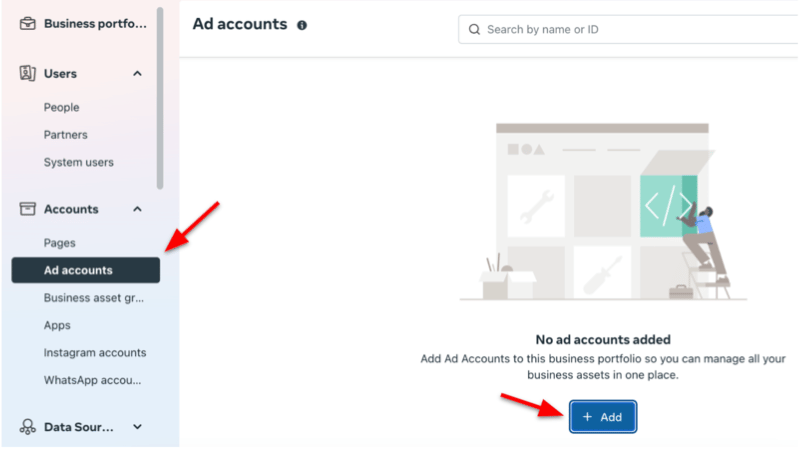
In the Meta Business Suite interface, go to “Settings,” find the “Accounts” group, and select “Ad accounts.” This is the central area where Meta manages all advertising resources linked to the business portfolio.
Step 2: Initialize the add account action
In the ad account list screen, click the “+ Add” button displayed in blue. This is the operation to activate the creation right, which only appears when the Business Manager still has an available limit. In many cases, this button not only does not appear, but also means the Business is not eligible to expand advertising resources.
Step 3: Choose the option to create a new account
From the options provided by Meta, select “How to create a new ad account.” This choice determines that the account will be created completely fresh and linked directly to the current Business Manager, instead of using an existing ad account from another entity or requesting external access.
Step 4: Declare the account’s core information
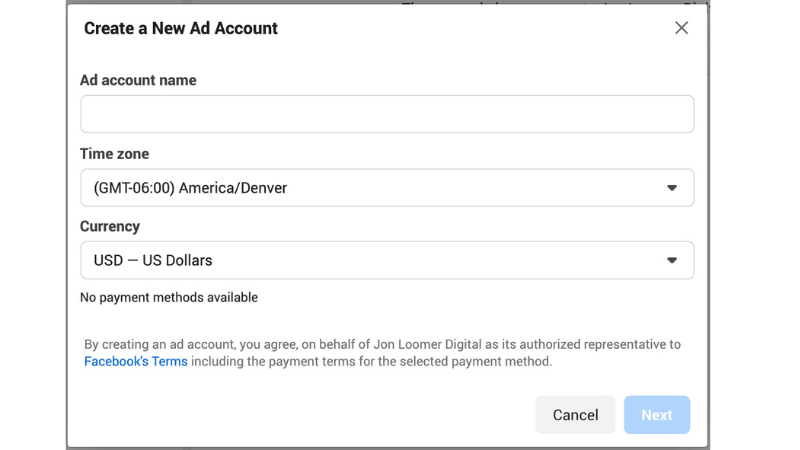
The system requires filling in the ad account name, time zone, and currency. These are fixed parameters that affect cost reporting, ad distribution time, and how Meta records data. After confirming and clicking “Next,” this information is almost impossible to edit again without incurring operational risks.
Step 5: Confirm usage purpose and terms
Meta further requires declaring the account’s usage purpose and confirming the related terms. Once the ad account is created and linked to the business portfolio, it cannot be permanently deleted. The system only allows closing the account and reactivating it when needed, while each Business Manager is subject to a certain limit on the number of ad accounts.
Step 6: Complete by adding a payment method
An ad account is only truly ready to operate after at least one valid payment method is added. This is a mandatory condition for Meta to activate ad distribution capabilities. The payment method attached at this step is also one of the factors affecting the credibility and payment history of the account later on.
Keeping a new ad account in a stable state
A new ad account is always within the system’s close observation zone. The early stage not only determines distribution capabilities but also directly affects spending thresholds, durability, and the risk of future restrictions. To maintain a long-term stable state, it is necessary to control the operational pace from the very first days, instead of focusing too early on performance or expanding the budget.
Safe and running pace in the first 14 days
In the first two weeks, Meta prioritizes evaluating behavior over results. The system monitors the frequency of edits, the degree of change in campaign structure, payment history, and budget distribution methods. Accounts that maintain a steady running pace, a stable budget, and do not switch on and off constantly are usually labeled as low risk.
In reality, accounts that pass this stage smoothly share commonalities: few major changes in a short time, ad content consistent with the Page and landing page, and no payment errors or consecutive rejections. This is the stage for building a foundation for credibility, not the time for intensive testing.
Expanding spending without dropping trust
When an account begins to distribute stably, increasing the budget needs to happen according to a logic that the system can keep up with. Accounts that expand spending at an incremental pace usually maintain better distribution status than those with sudden budget jumps. Operational data shows that Meta reacts positively to accounts that keep spending ratios, performance, and payments at a balanced level.
When spending increases, but behavior remains consistent, the system does not need to trigger additional check mechanisms. Conversely, a sharp increase in budget in a short time often leads to a trust re-evaluation, especially for accounts without a long enough history.
Signs of passing the monitoring stage
After the initial monitoring phase, the account begins to show clear signs of differentiation. Distribution becomes more stable despite minor adjustments, ads are less frequently re-reviewed, and spending limits expand naturally without manual requests.
At the system level, the account is now categorized into a higher credibility group, allowing for more flexibility in operation. This is also the time when changes in content, budget, or campaign structure cause less significant volatility, indicating that the account has escaped the initial strict control zone and is ready for a long-term strategy.
- Ads are approved faster and more stably: No more situations where the same content is sometimes approved and sometimes not; review time is significantly shortened and less subject to re-scanning during minor edits.
- Increased budget without throttled distribution: When spending increases, ads still run steadily, without abnormal reach drops, without “freezing,” or spending very slowly, like in the early stage.
- Fewer warnings in Ads Manager: No notifications like “unusual activity” or “additional verification needed” appear even though the account is operating normally.
- Sharp decrease in ad rejection rates: Content with the same tone and structure but with a lower reject rate than before, showing the system has a history reliable enough not to be scrutinized from scratch.
- Natural expansion of spending limits: No need to send a limit increase request; the account still tends to have its spending ceiling raised over time based on usage and payment history.
- Minor edits do not shock the system: Changing headlines, creatives, slight targeting adjustments, or budget scaling does not cause campaigns to “drop” en masse as they did when newly created.
- Smooth payments, no held funds: Fewer transaction errors, no payment hangs or continuous requests for card verification.
When going in the right direction from the start, the account not only operates stably but also creates a foundation for long-term scaling, limiting the risk of being restricted or disabled. This is the difference between being able to run ads and operating ads as a sustainable system.
Frequently Asked Questions
This is a new AI-based scanning mechanism. If the business information in the BM (Address, Tax ID) does not match the information on the Fanpage or the credit card payment information, Meta will block the creation of additional accounts to prevent business impersonation behavior. Re-check the “Business Info” section in BM Settings. Ensure all information from the company name to the website address is 100% consistent with the business license and bank card registration information.
This is a step to classify advertising goals from the start to apply different policy filters. If you choose the purpose as “Finance” or “Credit,” that account will immediately be subject to the review rules of Special Ad Categories. Be honest when choosing. If you choose the wrong purpose to avoid censorship, AI will identify the content later and lock the entire BM for the “Circumventing systems” error.


