Constantly encountering content related to betting, gambling, or games of chance can make many users feel annoyed and distracted while browsing social media. That is why how to stop gambling ads on Facebook is gaining more attention, especially for those who want to keep their News Feed clean and safe. By clearly understanding how to stop gambling ads on Facebook, you can proactively control the type of content displayed, limit the negative impact of inappropriate ads, and better protect your personal experience. Adjusting Ad Preferences is not overly complex, but it brings tangible results in filtering content, helping Facebook become a true space for entertainment and connection instead of being bothered by unwanted information.
How does Facebook advertise gambling?
Facebook has become a giant advertising platform, where bookmakers and online gambling services seek every way to reach billions of users. The mechanism behind why you see these ads is far more complex than just casually scrolling past. It relies on an extremely sophisticated system for collecting and analyzing users’ viewing and browsing behavior data.
Facebook’s primary goal is to ensure ads are displayed to the right audience. To do this, the platform continuously reads, analyzes, and interprets your every interaction. This includes what you view, click on, search for, and even the time you spend on a specific piece of content.
These behaviors form a detailed digital profile of your interests and habits. If you have ever interacted with content related to sports, betting, games of chance, or even just articles related to money and risk, the system will identify you as a potential target for gambling ads.
Off-platform data collection
Not only does the platform stop at what you do on Facebook and Instagram, but it also uses data from your Off-Facebook activity. This is information that other websites, apps, and businesses share with Facebook about your interactions with them.
Example: If you visit a sports website linked to Facebook or download an app with betting features, these behaviors will be recorded and sent back to Facebook to build your advertising profile.
Detailed audience segmentation
Gambling advertisers do not just use general targeting. They use sophisticated tools to select audiences based on:
- Geographic location: Only displayed in regions where gambling is legally permitted.
- Age and gender: Targeting demographic groups with high spending potential.
- Specific interests: People interested in football, horse racing, or poker.
- Shopping behavior: Users who have previously purchased or shown interest in luxury goods or risky services.
It is precisely because of this mechanism of reading data from users’ viewing and browsing behavior that the platform displays and suggests related content. If you want to completely block Facebook gambling ads, you must use third-party tools. Facebook will always seek to fill ad space with content it believes you are interested in.
Privacy policy and personally identifiable information)
An important point to note is that Facebook does not share your PII or information that can be used to contact you (name, email address, phone number, etc.) unless you permit it.
This is a core privacy commitment. When you see an ad, the advertiser only sees that they have reached “a user within audience groups A, B, and C,” not your specific name.
However, you need to read carefully when Facebook asks for permission for third-party apps to access your information. Many apps and games may request access to your friends list, email address, or other public data. Granting this permission can indirectly expose your personal information to those third parties, even though Facebook does not directly sell it.
Inside ad preferences settings
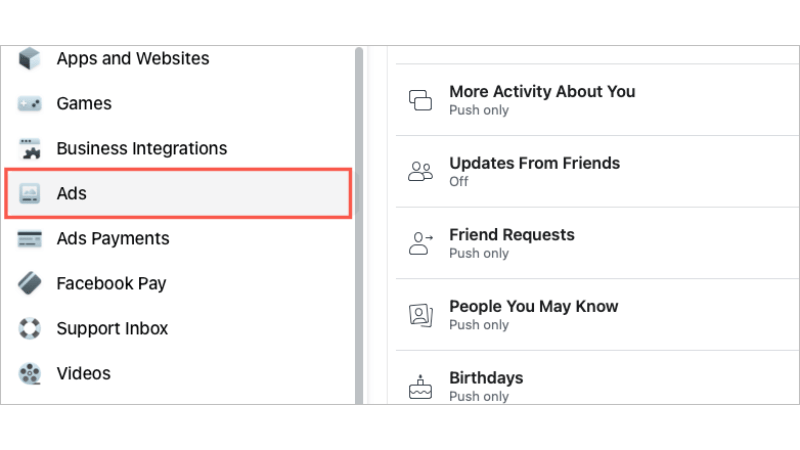
The “Ad Preferences” section is the control center for fine-tuning the ads you see. Accessing and adjusting this section significantly helps minimize unwanted content such as gambling.
Advertisers
This is where you can directly interact with specific advertisers.
- Review and Manually Hide: You can review the advertisers who have recently shown you ads (or those you have clicked on).
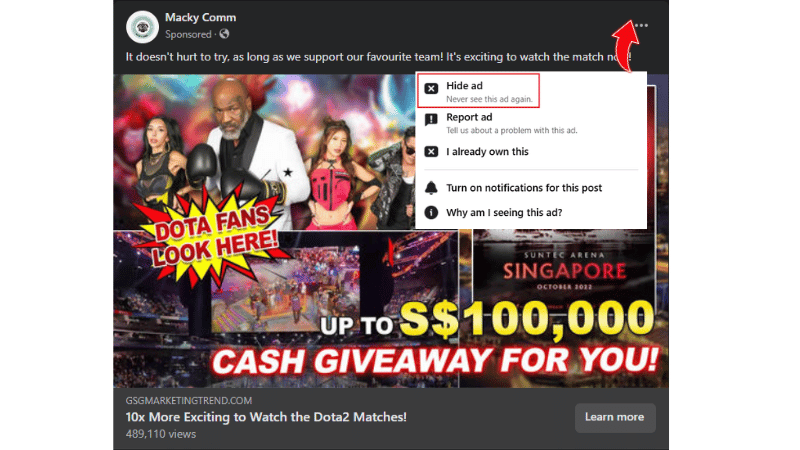
- If you see a recurring gambling advertising brand, manually hide it from your News Feed. This action will reduce the frequency with which you see ads from that provider.
Ad Topics
Ad Topics allow you to adjust the interest categories that Facebook uses for ad targeting.
- Manage Topics: You can see the topics Facebook has categorized you into. Look for and select topics indirectly related to gambling or risk (e.g., Sports, Betting) and choose “Reduce” to lessen related ads.
- Sensitive Topics: For other sensitive topics (alcohol, politics), Facebook also allows you to limit or “Hide” ads.
Data
The Data section is important for controlling how personal information is used for advertising, both on and off-Facebook.
- Third-party data (Off-Facebook Activity): This is data from websites/apps you visit outside of Facebook. You can Clear History to remove all Off-Facebook activity data and disconnect your account from the use of this data. This is an extremely effective measure to prevent retargeting ads.
- Ads off Facebook: You can also manage how data from Facebook is used to show you ads when you browse the web on other websites/apps.
- Behavioral and interest categories: You can manually view and delete specific behavioral or interest categories that Facebook has assigned to you (e.g., “Interested in Betting”). Removing these tags is a direct action to prevent gambling ads.
Ad preferences: Stop gambling ads on Facebook in just 3 steps
Blocking gambling ads, especially forms of casino ad on Facebook, requires proactive management of your advertising profile. Here are three simple yet effective action steps to fine-tune your preferences, presented in continuous paragraph format.
Step 1: Go to “Ad preferences”
First, you need to access your personal ad management tool on Facebook. To begin, go to Settings & Privacy on your mobile app or computer, then select Settings. From there, scroll down to the Ads section and choose Ad Preferences. This is the gateway to all the settings you need to adjust to control your ad experience.
Step 2: Control the data Facebook distributes
After entering “Ad Preferences,” you will need to delve into the Advertisers, Ad Topics, and Data sections to erase any data traces related to gambling or risky activities. In the Advertisers section, review the list of “Advertisers you’ve recently seen.”
If you recognize specific betting companies or bookmakers, you should choose to hide or permanently hide their ads. Next, move to the Ad Topics section to look for topics indirectly related to gambling, such as sports or betting, and select Reduce for them.
Most importantly, access the Data section, then select Off-Facebook Activity. You should choose to Clear History to remove all tracking data from external websites that might be gambling sites you have visited. Select Manage Future Activity and turn off this option; this action will prevent external websites from sending data about your behavior to Facebook for future ad targeting.
Note that advertisers may show similar ads to multiple audiences or broader audiences. So, if you remove football from your interest list but keep rugby, for instance, you might still see ads from a business broadly targeting people interested in sports.
Step 3: Click “See less” and save changes
After reviewing and performing all actions to delete, hide, and disable data in the Advertisers, Ad Topics, and Data sections, the final action is to ensure that all these changes are saved and effectively applied.
Most changes in the “Ad Preferences” section will be applied immediately when you perform them, but you should look for any “Save” or “Update” buttons at the bottom of each section to confirm.
Frequently Asked Questions
Facebook typically does not list “Gambling” as a standalone sensitive topic like alcohol or politics for all regions. Instead, gambling ads are regulated through broader categories like “Sports, Betting interests,” or are targeted based on Off-Facebook Activity. Therefore, you need to disable or reduce those related categories instead of looking for a specific topic.
When you clear your off-Facebook activity history, Facebook commits to disconnecting that data from your personal account so that it is no longer used for ad targeting purposes. However, Facebook may retain the data in aggregate, anonymized form for internal analysis and general system improvement, but not for personalizing ads specifically for you.


