Scaling large-scale cryptocurrency, Web3, or DeFi marketing campaigns on Meta requires far more than persuasive copywriting or optimized visual assets. The definitive factor determining the survival and profitability of your entire operation rests on a deeply technical layer that many media buying teams overlook: Digital Fingerprint Protocol Alignment.
In 2026, Meta’s automated risk-mitigation systems deploy highly sophisticated Network Risk Assessment protocols. Even a minor discrepancy in your IP connection metrics or the detection of a data center node will trigger an immediate, permanent checkpoint lock on your advertising assets.
To build an immutable, continuous traffic ecosystem, professional advertisers must establish full control over their deployment of residential proxies for Facebook ads. This institutional guide breaks down Meta’s algorithmic IP scanning mechanisms, differentiates proxy tiers, and establishes the optimal infrastructure configuration required for high-volume Facebook crypto ad account management.
Decoding Meta’s Network Scanners: Why Standard Connections Truncate Campaigns
Most cross-border digital marketers entering the Web3 space make the critical mistake of using standard commercial Virtual Private Networks (VPNs) or cheap data center proxies to manage their business profiles. Meta’s server-side security protocols identify and flag these generic routing channels within milliseconds based on two primary diagnostic indicators:

A. The Autonomous System Number (ASN) Classification
Every IP address assigned globally is tied to a specific Autonomous System Number (ASN). IP addresses originating from major cloud hosting infrastructures—such as Amazon Web Services (AWS), DigitalOcean, Linode, or Google Cloud—are automatically classified as commercial data center networks. Meta’s authentication algorithms operate on a simple rule: standard retail users do not browse social feeds from a data center. Consequently, any active management or ad launching session initiated from a commercial ASN triggers an immediate high-risk threat flag.
B. IP Reputation Scores and Subnet Contamination
Budget proxy providers pool their resources among thousands of users, frequently packing active connections onto shared subnets. These subnets are systematically polluted by automated spam operations, scrapers, and malicious advertising activities. When a single IP address within a shared subnet is restricted for policy violations, Meta’s defensive algorithms blacklist the entire surrounding IP pool. Running premium Web3 ad assets on a contaminated subnet results in automatic, systemic account disables without any human manual evaluation of your actual ad creatives.
The Mechanics of Elite Residential Proxies: Securing Local Behavioral Signatures
To consistently pass Meta’s automated network checks, your operational architecture must utilize true residential proxy networks. These addresses are provisioned directly by legitimate Internet Service Providers (ISPs) like AT&T, Comcast, or Vodafone to real households. By routing your operational data lines through these consumer access points, your connection footprint becomes visually identical to an authentic local user, safely clearing standard automated IP filters.
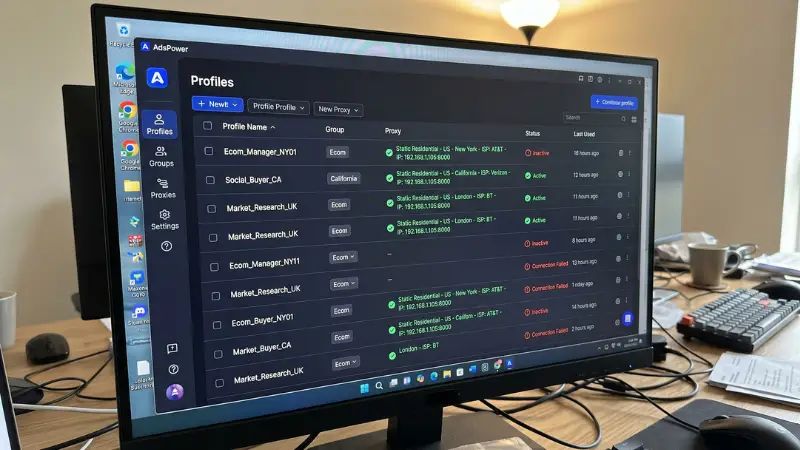
However, within the high-stakes crypto marketing niche, all residential connections are not created equal. To secure true operational immunity, your technical team must enforce the following strict sourcing parameters:
- Static Residential Tiers (ISP Proxies): Never utilize rotating residential proxies for active ad campaign modifications or profile warming. Meta monitors localized sessions closely; shifting your IP location every five minutes triggers immediate security checkpoints. Static ISP proxies grant you an unchanging, dedicated residential IP address over extended monthly cycles, establishing deep behavioral consistency.
- Independent Fraud Score Validation: Before binding any new proxy node to your browser profiles, explicitly run the address through advanced behavioral data systems such as IPLeak or Scamalytics. Enforce a zero-tolerance baseline: any proxy exhibiting an active fraud score higher than 10% or appearing on historical spam lists must be discarded immediately.
Advanced Synchronization with Anti-Detect Browser Environments
Deploying clean residential proxies for Facebook ads satisfies only the network layer of the verification process. To ensure absolute operational isolation, the proxy configuration must be synchronized flawlessly with an advanced anti-detect browser environment (such as AdsPower or Multilogin) to manage structural parameters.

When constructing your virtual work stations, ensure that the browser’s fingerprint emulation matrix automatically inherits and adapts to the native metadata of the assigned proxy:
- WebRTC Management: Explicitly configure your WebRTC parameter to Altered or Forward to match the proxy IP. If you attach a premium US residential proxy but your WebRTC parameter leaks your team’s real physical routing origin, Meta’s security engine will instantly flag the session for device-identity deception.
- Timezone and Language Calibration: If your assigned static ISP proxy is geolocated in New York (EST/GMT-5), your anti-detect profile must mirror this exactly. The system timezone must lock to GMT-5 and the browser language string must order English (US) as the dominant locale.
- Hardware Concurrency Truncation: Ensure canvas, WebGL, and audio context fingerprints are unique across every isolated profile instance, creating entirely independent digital footprints that prevent multi-asset link failures.
The Structural Apex: Combining Clean Networks with Corporate Agency Logs
While pristine residential connections coupled with anti-detect containers isolate your device profile from hardware checkpoints, your operation remains exposed if the underlying advertising asset lacks historical authority. When standard profiles encounter macro-level policy sweeps targeting Web3 or financial assets, they are frequently terminated due to low internal trust scoring.
To achieve unrestricted scaling and protect your deployment capital during volatile market shifts, professional media buyers completely migrate away from personal business setups. The ultimate technical synergy involves pairing a clean residential infrastructure with whitelisted corporate agency accounts.
By deploying your crypto campaigns through a premium rent Facebook ads account system handled by verified institutional networks like Optimal.to, your enterprise secures an unyielding operational foundation:
- Algorithmic Pre-Whitelisting: Accounts provisioned by Optimal.to belong to legacy, high-tier Meta Partner Business Managers with massive historical spending profiles. Operating these highly authoritative accounts via clean static residential proxies creates a highly trusted ecosystem, allowing your Web3 creatives to clear compliance filters with ease.
- Instant Uncapped Spending Capacities: Eliminate the operational drag of standard account caps. Your media buyers can instantly deploy significant daily budgets to capitalize on fast-moving market trends without facing sudden velocity holds.
- Capital Security Integration: Working with corporate agency providers shifts the risk away from your balance sheet. In the event of an unpreventable platform policy shift, the technical team at Optimal.to immediately executes a full migration protocol—safely transferring your remaining funds and shared pixel routing parameters to a fresh, active corporate node within 15 minutes.
Technical Network Deployment Checklist
Enforce this exact technical screening process across your entire marketing department prior to launching any active Web3 campaigns:
[ ] ISP Tier Verification: Confirm that all active profiles are operating on dedicated, non-rotating Static Residential (ISP) connections.
[ ] Fraud Index Threshold: Ensure the verified Fraud Score of the IP node measures under 10% on independent security databases.
[ ] DNS-IP Alignment Check: Verify that the geolocation and country data of the DNS server exactly match the outbound proxy routing origin.
[ ] Asset Fingerprint Separation: Maintain a strict 1:1:1 allocation model—one dedicated anti-detect profile, connected through one unique static residential proxy, running one isolated corporate agency log. Never allow multi-profile cross-contamination.


