Most advertisers enter Facebook ads for mortgage leads expecting a shortcut to a steady stream of leads. When faced with quiet months or slow growth periods, it is easy to believe that simply pouring budget into traffic can quickly reverse results and fill the customer pipeline. However, reality shows that Facebook ads do not solve the core issues many advertisers encounter.
Paid advertising cannot substitute for a brand; it only amplifies what already exists. When positioning lacks clarity, content is inconsistent, and the online presence is insufficient to prove professional expertise, Facebook ads for mortgage leads struggle to turn strangers into clients ready to place their trust. Nevertheless, Facebook Ads remains highly attractive due to its location targeting capabilities, rapid messaging testing, and scalability when campaigns show positive signals.
Should you choose a personal Facebook profile or a business page?
Before discussing content strategy, advertising, or audience building, it is first necessary to clarify the nature of the two types of Facebook accounts that many people use in parallel without truly understanding them. A personal Facebook profile and a business Facebook page differ not only in their display format but also clearly in their roles, credibility levels, and ability to support long-term business goals.
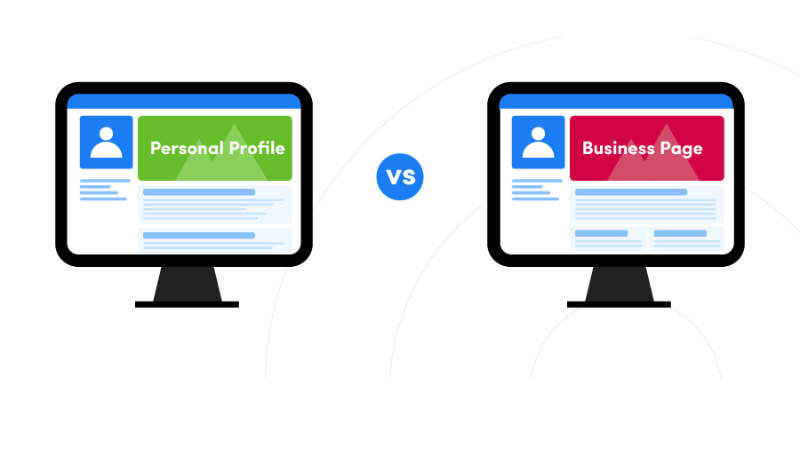
Personal Facebook profile
A personal Facebook profile is designed to represent a specific human being. This is the standard profile that any user can create, featuring familiar components such as friends, followers, the newsfeed, stories, and private messages. In essence, a personal profile reflects the identity, thoughts, activities, and social relationships of an individual, not a legal entity or organization.
The greatest strength of a personal profile lies in the “human” element. Posted content is often relatable and everyday, making it easier to build trust during the initial outreach phase. Readers tend to engage with a clear individual who has opinions and real experiences rather than an anonymous entity. Therefore, many individuals in high-value services, consulting, or sales choose to use personal profiles to build initial trust.
However, personal profiles also have distinct limitations:
- Limited number of friends.
- No public review system.
- No display of operational information, such as business hours or service categories.
- Not designed to represent a long-term brand.
These limitations make a personal profile more suitable for building a personal image, sharing knowledge, and creating connections rather than serving as the main hub for large-scale business operations.
Facebook business page
Conversely, a Facebook business page is created to represent a specific organization, brand, or business model. A business page does not have “friends” but instead has likes and followers. This is a structural difference, indicating that business pages are designed to serve the masses, unrestricted by personal relationships.
A business page allows for the display of many operational and authentication elements, such as:
- Business information and industry sector.
- Opening hours, address, and contact methods.
- Public reviews from customers.
- Service or product catalogs.
These factors create a more official and professional feel, especially for customers who have never heard of the brand. Additionally, a Facebook business page is a mandatory platform if you want to implement professional advertising, analyze data, and scale your reach.
However, the common weakness of a business page is its lower organic engagement compared to a personal profile. Branded content that lacks depth or a clear personality is easily ignored on the user’s newsfeed.
Which platform should be prioritized?
If the primary goal is building personal credibility, sharing professional expertise, and creating direct relationships with a potential client base, a personal profile often provides a clear initial advantage. Conversely, if the direction is sustainable brand development, requiring authentication, public reviews, and the ability to scale through advertising, a business page is an indispensable choice.
In practice, many effective models choose to combine both: the personal profile plays the role of building trust and professional voice, while the business page handles the brand identity, advertising, and conversion. The issue is not about choosing which one is “right,” but about clearly understanding the role of each platform to use it for the right purpose, at the right time, and with the right strategy.
Setting up Facebook ads for effective traffic
To implement a Facebook ad campaign aimed at driving traffic to a website, you must go through a relatively strict setup process. Each step in Ads Manager directly affects delivery, cost, and traffic quality.
Step 1: Accessing the Ads Manager
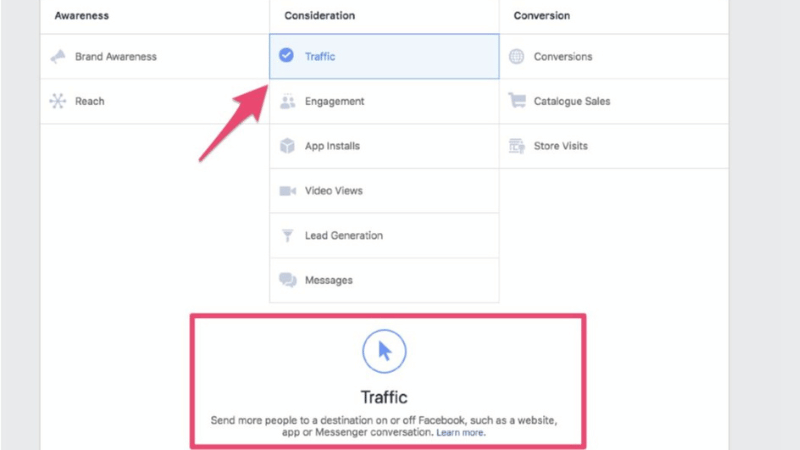
On your Facebook page, there is an “Ads” section in the menu. Clicking here takes you directly to Ads Manager, the command center for all paid traffic activities. On the first screen, Facebook asks you to choose a campaign objective. Since the goal is to drive users to a website, the appropriate choice is Traffic.
After selecting the objective, proceed to name the campaign. Consistent naming from the start makes managing, comparing, and analyzing data easier later on, especially as the number of campaigns increases.
One crucial step that must not be overlooked is the Special Facebook Ad Category. For content related to mortgages, you are required to select the appropriate category. This helps Facebook apply the correct delivery mechanisms and avoid the risk of policy violations at the campaign level.
Step 2: Setting up the Ad Set and optimizing delivery goals
After clicking Next, you move to the Ad Set level. Here, naming the Ad Set identically or directly related to the campaign name will help you track performance more easily.
Under Performance Goal, you can choose between Link Clicks or Landing Page Views. In the initial phase, optimizing for Link Clicks helps Facebook deliver ads to people prone to clicking, thereby generating traffic for the website, quiz, or funnel you are building.
The budget is a factor that needs to be strictly controlled. For a testing campaign, a small budget of 2 USD per day is enough to collect initial signals. You can set the start date to the present and leave the end date blank, as the campaign can be turned off at any time if adjustments are needed.
Step 3: Building the Audience and guiding the algorithm
In the Audience section, start by defining the geographic location. Facebook defaults to nationwide distribution; however, you can narrow down the area if you only serve a specific market.
Next is Detailed Targeting. By clicking Edit, you can add relevant interests and behaviors. For example, for the group of first-time homebuyers, selecting “first-time home buyer” helps Facebook better understand your target audience. Although there are many related suggestions like mortgage loans or calculators, keeping the targeting concise prevents the algorithm from being distracted during the initial phase.
Step 4: Choosing Placements suited to the content format
Placements determine where the ad is displayed. If you only want the ad to appear on Facebook, selecting Manual Placements is necessary. For square-format videos, removing Stories, Reels, or 9:16 placements ensures a consistent display experience.
Facebook Feed, Profile Feed, or positions supporting 1:1 and 4:5 ratios typically offer better visibility for this type of video. Reviewing each placement helps you avoid wasting budget on locations unsuitable for the content.
Step 5: Setting up the ad and finalizing content
After completing the Ad Set, move to the Ad level. Here, select the Facebook page as the identity, manually upload the video, and proceed with the ad content setup.
The content includes:
- Primary Text
- Headline
- Call to Action (CTA)
You can prepare multiple versions of the content so that Facebook can automatically combine and distribute the higher-performing version. The Short Headline plays a supporting role; it does not appear in all placements, but still needs to be clearly defined.
Next, upload the video, keep the original dimensions, and preview the ad on the selected placements. When all elements are valid, a green checkmark will appear, indicating no technical errors.
Step 6: Attaching URL, tracking, and publishing
In the final step, paste the website or landing page URL. This is where the traffic will be directed, so the link must be absolutely accurate. If you want detailed performance tracking, adding URL Parameters (UTM) helps you analyze the traffic source, campaign, and Ad Set in your measurement system. Once finished, click Publish to send the ad into the review state. Review time usually lasts a few hours, and once approved, you will receive a notification from Facebook via email.
Frequently Asked Questions
Yes, but it must be a Hybrid Model (a mix of human and machine). Borrowers are often anxious and require high trust; a pure bot giving cookie-cutter answers will lose customers within the first minute. Use the bot to collect three basic pieces of information: Loan Purpose, Estimated Amount, and Annual Income. Then, set up notifications so that a real consultant can join the conversation within 5 minutes. Human response speed combined with bot screening is the highest conversion formula for 2026.
The Pixel relies on browsers, which have been hampered by new security settings. CAPI allows you to send data from your CRM back to Facebook. When a Lead becomes “Qualified” in your CRM, send that signal back to Facebook via CAPI. Meta will use this data to find people who don’t just “fill out the form” but are “likely to qualify for a loan,” helping to optimize the budget toward the right high-quality audience segment.


