Digital content monetization is no longer a distant dream if you approach it with the right methodology and clearly understand how Meta operates its monetization system. Instead of directionless experimentation, how to setup Facebook monetization needs to be implemented systematically from the start to unlock formats such as In-stream ads, exclusive content, or paid subscriptions. This article focuses on clarifying the technical process and critical control points, helping you avoid common mistakes that lead to delayed reviews or policy violations. When performed correctly, how to set up Facebook monetization for a personal profile or Fanpage will not only generate revenue but also form a foundation for sustainable long-term growth.
Building a content strategy to optimize revenue from Facebook Monetization
As Facebook expands its content monetization programs, the creator’s challenge is no longer just “posting a lot to get views,” but moving to a higher level: posting the right content, in the right format, for the right audience to generate actual revenue.
Do you have a posting strategy yet?
The content monetization program allows Facebook Pages to generate revenue from almost the entire content ecosystem: long-form videos, Reels, images, and Stories. However, having multiple formats does not mean they all provide the same financial efficiency. Without a clear posting strategy, content easily becomes fragmented, consuming production effort without creating proportional value.
The key lies in identifying which format is generating the highest revenue, rather than just looking at view counts or superficial engagement levels. Facebook provides quite detailed data on earnings by content type in the monetization dashboard. After a short period of implementation, Page managers can fully identify:
- What percentage of revenue are Reels contributing?
- The CPM and total earnings generated by long-form videos.
- Whether Stories and images are truly worth investing resources in.
Based on that data, the most effective strategy is not to “choose one format and ignore the rest,” but to conduct controlled testing. Posting diverse content in the initial phase helps collect sufficient data, after which resources can be concentrated on the formats that yield the highest financial value. On that basis, posting frequency is adjusted to fit the audience size and production capacity, which can range from a few posts to many posts per day, but always based on data rather than intuition.
Is the audience optimized for revenue?
One of the most common paradoxes on Facebook is a Page with a large following but low revenue. The cause does not lie in low-quality content, but in an audience base that does not align with the platform’s payment mechanisms.
Facebook only pays for eligible views, and not all views have equal value. For the same video, the CPM can vary greatly depending on the viewer’s country. Markets such as the US, Canada, and the UK typically yield significantly higher payouts than many other regions.
Therefore, optimizing revenue is not just about increasing views, but also about restructuring the audience to achieve higher commercial value. This approach typically includes:
- Analyzing viewer distribution by country in Facebook Insights.
- Identifying the group of countries generating high CPM.
- Adjusting content to suit the tastes of the target audience group.
- Combining advertising to attract followers from high-value markets.
If the audience is not optimized, even if a video reaches millions of views, revenue can remain very low. This is also why many creators are forced to change their mindset, from content for the masses to content for the right viewer segment that generates revenue.
Are you reformatting videos correctly?
Content formatting is a technical factor that has a direct impact on the ability to scale revenue. A common mistake is using the same Facebook ads video format for both the News Feed and Reels, while user behavior in these two environments is completely different.
To maximize content value, strategic content repurposing is mandatory. A single video can be converted into multiple versions, each serving a specific consumption context:
- A version optimized for the News Feed, focusing on duration and content depth.
- A version optimized for Reels, short, fast-paced, and engaging from the first second.
- Small snippets to maintain appearance frequency and increase reach.
When done correctly, the same original content can create multiple parallel revenue streams instead of just monetizing once. This is the foundation for scaling: increasing views, increasing followers, and more importantly, increasing income sustainably. Many creators fail to reach their desired revenue levels simply because they stop too early with a single format, while the potential for content exploitation remains vast.
Eligibility and documentation required to register for Facebook monetization properly
To participate in Facebook’s content monetization program, one must simultaneously meet several conditions related to policies, legalities, and payment documentation. Understanding each requirement from the start helps minimize the risk of being rejected or having monetization disabled later.
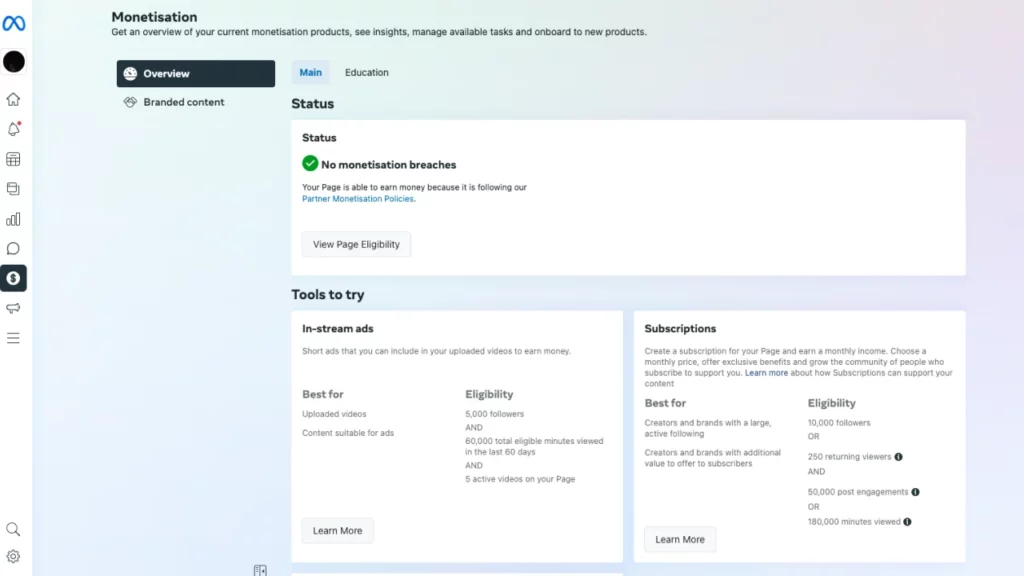
Mandatory conditions to qualify for Facebook monetization registration
First, Facebook sets fundamental criteria to ensure that creators participating in the monetization program have sufficient maturity, stable activity, and comply with community standards. Advertisers must be 18 years of age or older. This is a mandatory requirement directly related to legal issues, specifically tax procedures and international payments.
Additionally, you must reside in a country on the list supported by Facebook for monetization. Not every country is eligible, so checking the residential region before registering is a step that cannot be skipped. Regarding account metrics, Facebook clearly distinguishes between a Facebook profile and a Facebook page:
- Must have a minimum of 5,000 followers on a personal profile (regular Facebook profile).
- Simultaneously, must have at least 10,000 followers on a Facebook Fanpage.
These are two parallel conditions that cannot replace each other. Many people make the mistake of only focusing on developing the Fanpage while ignoring the personal profile, leading to ineligibility.
Advertisers must reach a minimum of 160 minutes of total watch time within the last 60 days before registration. Compared to previously, when Facebook required up to 600,000 one-minute video views, the current conditions have been significantly relaxed, creating opportunities for more creators. Furthermore, the account must maintain at least 5 active videos on the page or profile. These videos need to be public, not in violation of policies, and still have distribution.
Full compliance with Partner Monetization Policies, Content Monetization Policies, and Facebook Community Standards is required. Just one serious violation can lead to Facebook permanently disabling monetization, and in reality, the possibility of restoration is nearly zero. Therefore, a thorough review of content, images, sound, and video origins is mandatory before turning on monetization.
Documents to prepare before registering for Facebook monetization
The first and most important document is the Tax Identification Number (TIN). To obtain a TIN, you are required to register a business name or register as an individual business entity. In cases where there is no business, you can fully register under a personal name, treated as an independent individual business model.
Please note clearly:
- There is no valid way to obtain a tax identification number through Google or unofficial websites.
- A tax identification number is only valid when issued by a competent tax authority.
You can use intermediary services to support procedures; however, after receiving the tax identification number, you should directly verify it with the tax authority to ensure validity and avoid future risks.
Bank account for payments
Facebook pays revenue in foreign currency, so using a USD account provides convenience and long-term stability. Some local currencies are only valid within national borders:
- Naira is only used in Nigeria.
- Cedi is only used in Ghana.
USD is a globally accepted currency, helping to limit conversion barriers and intermediary fees. If you already have a bank account, simply requesting the bank to open an additional USD account is sufficient for use.
Swift Code, ZIP Code
During the form-filling process, Facebook will request the bank’s SWIFT Code; simply search using the formula: SWIFT Code + bank name + country.
Some banks use a common SWIFT code for all branches, but others apply specific Swift Codes for each branch, so it is necessary to choose the correct location where the account was opened.
The ZIP Code is the postal code of the residential area, which can be quickly looked up on Google. It should be prepared before filling out the form to avoid interrupting the operation.
Legal Name is not a business name, but the name appearing on legal personal documents, including:
- ID Card/Citizen ID
- Passport
- Driver’s License
- Voter Card
- Name on the bank account
The legal name must match tax and bank information exactly to avoid payment rejection.
How to check if an account is eligible for Facebook monetization
To quickly check eligibility status, follow these steps:
- Open the Facebook profile or Fanpage.
- Click on the profile picture → Professional Dashboard.
- Select Monetization.
Here, Facebook will display the tools you are eligible to use, for example:
- Ads on Reels.
- In-stream Ads (currently grouped under the name Content Monetization).
Click Set up, select Get Started, then respectively:
- Select Individual.
- Select Non-US resident (if not residing in the US).
- Enter Legal Name and Tax Identification Number.
- Fill in the address and ZIP Code.
- Sign the electronic confirmation.
- Submit the registration form.
Setting up the content monetization program in Meta Business Suite
To begin the process of activating monetization for a Facebook Page, Meta Business Suite is the mandatory access point and also the center for managing all activities related to content, payments, and policies.
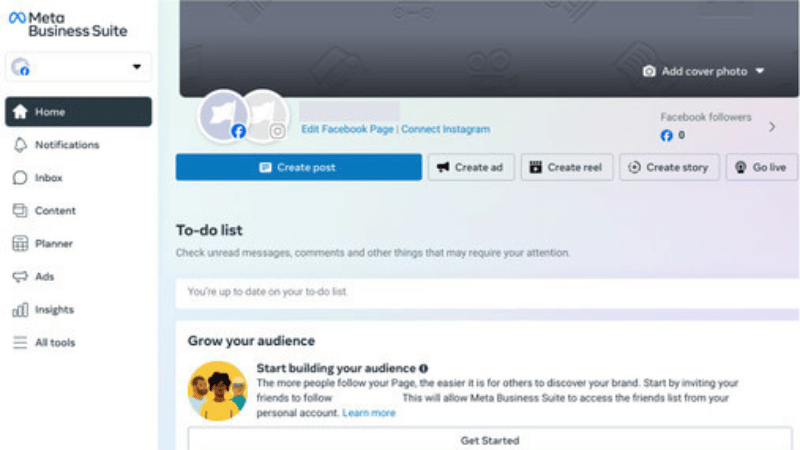
Step 1: Log in to Meta Business Suite
The first step in the entire process is to log in to Meta Business Suite via the address business.facebook.com. Using a desktop computer is recommended over a phone because the desktop interface allows for the display of all advanced options, especially sections related to payment profiles, information verification, and monetization tool management.
After a successful login, access the Monetization tab. Here, Meta will display an overview of the Facebook Page’s monetization status. If the Page does not violate monetization or content policies, the system will allow you to continue setting up. If the Page is eligible for specific tools like Content Monetization, an “Action Required” area will clearly appear for you to proceed.
Step 2: Initialize Content Monetization and confirm terms
Once Content Monetization is identified as available, simply click Get Started to proceed with the setup. In this step, Facebook presents two core requirements that Page administrators must complete.
The first requirement is to review and accept the monetization terms. You need to scroll to the bottom of the page and agree to all the terms provided by Facebook. This is a legal step, confirming that you clearly understand the obligations, benefits, as well as the limitations in the process of generating revenue from content.
The second requirement is to set up a payout account where Facebook will transfer monthly revenue. This account can be a bank account or PayPal, depending on your choice and conditions. Completing this step is a mandatory condition for Facebook to execute payments.
Some important points to note at this stage:
- Facebook only proceeds with payment when revenue reaches a minimum of $100/month.
- The payment cycle typically falls between the 18th and 21st of each month.
- Payment information needs to be matched and valid to avoid payment delays.
Step 3: Set up or select the appropriate payout account
After clicking Set up account and selecting Next, the system will display a list of existing payout accounts (if you have set them up previously). If you own multiple payout accounts, you can select the one most suitable for receiving revenue.
If you do not have a payout account, Facebook will require you to create a new one. Essentially, this process only involves linking the payout account to the bank account where you wish to receive funds. However, in some cases, Facebook may require you to:
- Provide tax documents.
- Verify the account through a small trial deposit sent by Facebook.
- Supplement identification information to ensure the validity of the account.
This verification ensures that revenue is transferred to the right person, the right account, and complies with international financial regulations. If a valid payout account is already available, you just need to select that account and continue to the next step without repeating the verification process.
Step 4: Complete confirmation and monetization approval for the Facebook Page
After selecting the payout account, click Next to complete the setup. In the final step, Meta will notify you that the entire process has been fully configured. At this point, you just need to click Done and then click Submit to send the official request.
Immediately after this action, your Facebook Page will be approved to participate in the content monetization program. Compared to before, the current process has been significantly simplified. Instead of waiting weeks for review as in the past, the new Content Monetization program allows for almost instant approval, helping creators start generating revenue from the very first day after completing setup.
Frequently Asked Questions
This is often a “Country Unavailable” error or an “Originality Violation.” Meta uses AI to scan content history; if your page has over 20% of its videos as aggregated content (re-ups) from other platforms without significant editing, the monetization button will be permanently locked.
Meta requires tax information to match the registered personal/business information perfectly. Tax IDs that are not primary or have incorrect regional formatting will be rejected by the system immediately, leading to funds being held in the system. Use an actual personal or business tax ID, and ensure the payout recipient name on the bank account matches every character of the name on the tax documents you provided in the Payout settings.


