Managing connections is a core skill for any Facebook user, especially for digital marketers and business owners who need to track networking trends. However, Meta’s 2026 interface updates have made finding “Recently Added Friends” a bit more hidden.
In this expert guide, Optimal Agency will show you the exact pathways to access this data on all devices and how to leverage these insights for professional growth.
Why You Need to Track Recently Added Friends
Beyond simple curiosity, tracking new connections is a vital part of Competitor Analysis and Audience Research.
- For Individuals: Reviewing new friends helps you manage your privacy and clean up your circle.
- For Businesses: Seeing who your competitors are friending can reveal their potential partners or target customer segments
Step-by-Step: Finding New Friends on Desktop (Web)
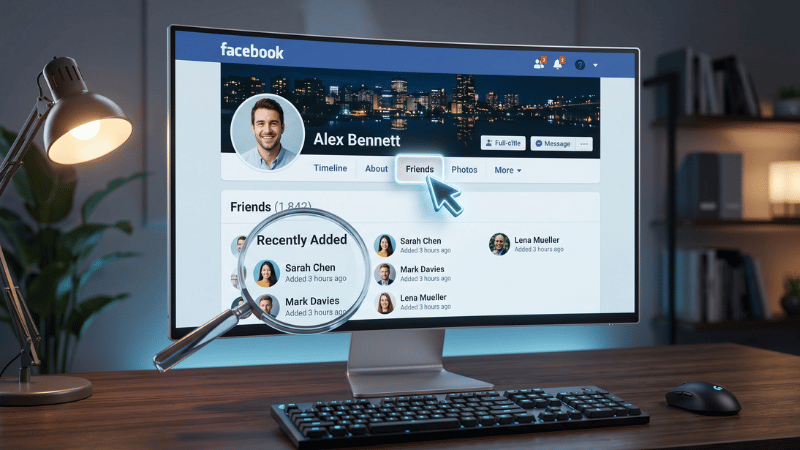
The desktop version remains the most powerful tool for detailed friend list management.
- Visit the Target Profile: Navigate to your profile or the person’s page you wish to audit.
- Access the “Friends” Tab: Located directly under the cover photo.
- Use the “Recently Added” Filter: Facebook categorizes friends added within the last 3.5 months (90-100 days) here.
- Expert Insight: If this tab is missing, it’s not always a bug. It usually means the user has reached their privacy limit or hasn’t added anyone new in the current quarter.
How to See Recently Added Friends on the Facebook App (Mobile)
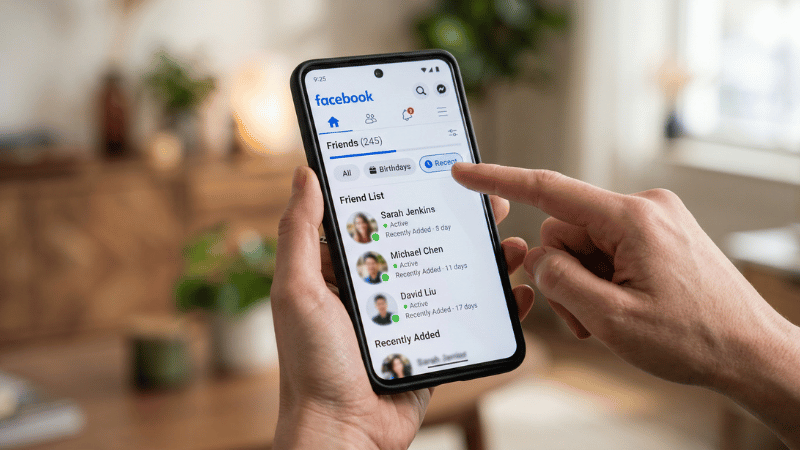
Mobile navigation is more compact in 2026. Follow these “shortcuts”:
- Open the profile and tap “See all friends”.
- Tap the “Recent” button at the top of the list.
- Pro Tip: If you can’t see the “Recent” filter, use the Activity Log (Settings > Activity Log > Connections > Added Friends) to see a chronological diary of every friend request accepted.
Platform Comparison: Desktop vs. Mobile
| Feature | Facebook Desktop (Web) | Facebook Mobile App |
| Display Interface | Clear horizontal list | Grid format with large images |
| “Recently Added” Filter | Directly in the Friends tab | Found within the “Recent” filter |
| Detail Level | More comprehensive and smoother | Optimized for quick actions |
| Best Use Case | Large friend lists | Quick on-the-go checks |
Troubleshooting: When the List is Hidden
As specialists in Facebook infrastructure, we often see users struggling with “Missing Data.” Here is why:
- Strict Privacy Settings: If a user sets their friend list to “Only Me,” no external tool can legitimately bypass this.
- Algorithm Glitches: Old versions of the Facebook app often fail to sync recent data. Always ensure you are on the 2026 latest version.
- Shadow Restrictions: If you check too many profiles in a short time, Facebook may temporarily hide friend data to prevent scraping.
From Social Networking to Business Scaling
Finding friends is the first step in building a network. But if you are using your profile for Facebook Advertising, a standard personal account is highly vulnerable to bans.
At Optimal Agency, we’ve observed that users who manually network heavily often trigger Meta’s security checkpoints. To run ads and scale your reach without these interruptions, you need a professional setup.
🚀 Take Your Facebook Business to the Next Level
Don’t let account restrictions stop your networking. If you are serious about scaling, a personal profile isn’t enough. Rent a Facebook Ad Account from us today. Our Agency accounts come with pre-established trust scores, allowing you to reach new “friends” and customers with zero downtime.
Frequently Asked Questions (FAQ)
A: Not through the “Recently Added” tab. You must use the Activity Log for a full yearly history.
A: This is usually a Cache Sync issue. Log out and back in on your mobile device to refresh the data from Meta’s servers.
A: Absolutely not. 99% of these apps are designed to steal your login credentials. Always use the official Facebook interface or Activity Log.


