How to put an ad on Facebook Marketplace is becoming a preferred choice for many shop owners and small businesses looking to reach local customers quickly. Instead of relying solely on the News Feed, Marketplace allows your products to appear exactly where users have a genuine shopping intent. By understanding how to put an ad on Facebook Marketplace, you can optimize images, titles, and descriptions to increase click-through rates without needing a large budget. The strength of this format lies in its visual nature, accessibility, and high “buy now” user behavior. However, for Facebook ads to be effective, you must pay attention to choosing the right category, clear content, and avoiding an overly salesy tone. When implemented correctly, the Marketplace not only helps increase views but also brings in customers with high conversion potential.
The appeal of a Marketplace listing
Facebook Marketplace is not merely a place to list products for sale; it actually functions as a channel to reach customers with pre-existing needs. Unlike running ads to “hit” interests or behaviors, Marketplace helps businesses appear at the exact moment customers are actively searching to buy.
Reaching customers with high purchase intent
The greatest strength of Marketplace lies in purchase intent. Users enter the Marketplace not for entertainment or news browsing, but to find products, compare prices, and make buying decisions.
When a business listing appears in search results, you are reaching a “hot” customer group ready to inquire and close deals much faster than other channels.
Customers on Marketplace tend to trust sellers who respond quickly, provide clear information, and have professional listings. When a business posts regularly with consistent content, real photos, and transparent descriptions.
You are gradually building personal and brand credibility without needing excessive promotional language. This trust is the key factor that makes customers willing to message and transact.
Increasing visibility without ad costs

A Marketplace listing can reach hundreds or even thousands of local users without spending on advertising, provided there are clear images, keyword-accurate titles, and reasonable prices.
Facebook will automatically distribute listings to people searching for similar products. This is a massive advantage for small businesses or new sellers with limited marketing budgets.
Marketplace allows customers to message directly with a single click. No complex steps or platform switching required.
Customers can ask about prices, product status, and close the deal right in Messenger. The shorter the buying journey, the higher the conversion rate, especially for products with quick purchase decisions.
Flexibility for various business models
Whether you sell physical products, liquidated goods, household items, technology, or operate in e-commerce, Marketplace can be utilized effectively.
For service businesses or restricted industries, Marketplace can serve as the first touchpoint, subsequently leading customers to a website, fanpage, or appropriate landing page. This helps businesses expand their customer base without being dependent on a single channel.
Through views, messages, and customer feedback, businesses can quickly identify which products are gaining interest, which price points are suitable, and which titles are more attractive. This is a valuable data source for adjusting sales strategies, optimizing content, and deciding whether to restock or discontinue products.
Implementing an effective “How to put an ad on Facebook Marketplace” strategy for businesses
After understanding the benefits, the next step for businesses is to implement the correct listing process to ensure posts are fully displayed to the right audience and easily drive conversions.
Step 1: Access the Marketplace from a Facebook account
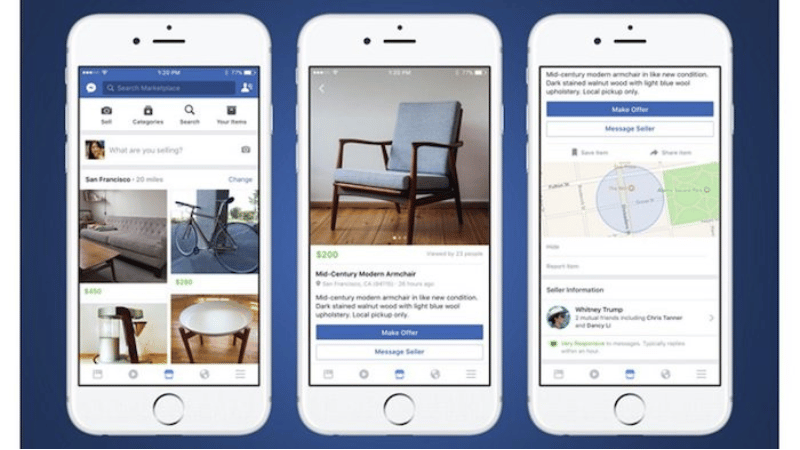
Log in to your Facebook account. Look at the left column of the screen, and you will see the Marketplace section. Click here to access it. In the Marketplace interface, Facebook will display existing listings along with all options related to buying and selling on this platform.
Step 2: Create a new listing and choose product type
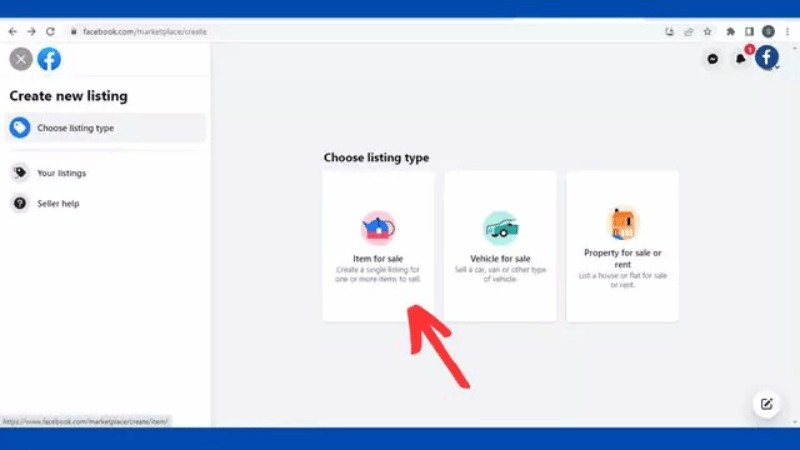
In the left sidebar, click on Create new listing. Facebook will ask you to choose the appropriate listing type, including:
- Items for Sale
- Vehicles for Sale
- Properties for Rent/Sale.
Each type has a different information structure, so businesses must choose the correct category to avoid visibility restrictions or slow approval.
Step 3: Enter basic product information
After selecting the listing type, begin entering critical information such as title, price, and product category. The category section has many options, such as furniture, electronics, baby products, jewelry, pet supplies, etc. Choose the category closest to the product, so Facebook distributes the post to the right interest group.
Step 4: Add images and finalize detailed content
Next, upload product images. You can select multiple photos; simply click Open, and the images will be added and displayed immediately below. Then, complete the following fields:
- Product Title
- Price (in your local currency)
- Product Condition (e.g., New)
- Detailed description, colors, and key features
When posting on Marketplace, providing clearer information leads to higher trust and a greater likelihood of receiving messages.
Step 5: Set location and fulfillment method
In the Location section, select the appropriate sales area. Below are fulfillment options such as public meetup, door pickup, or drop-off. Businesses can flexibly choose the form that fits their business model. Additionally, you can share this listing with friends if you want to increase initial reach.
Step 6: Review, post, and complete
Once everything is complete, click Next and choose to post on Marketplace. Facebook may suggest posting to related groups; if not needed, you can skip this. Finally, click Publish and wait a few seconds.
Immediately after, your listing will be publicly displayed on Facebook Marketplace. That is it, the business has completed the process of how to put an ad on Facebook Marketplace and is ready to reach potential customers directly and effectively.
5 Tips to optimize how to put an ad on Facebook Marketplace to double clicks
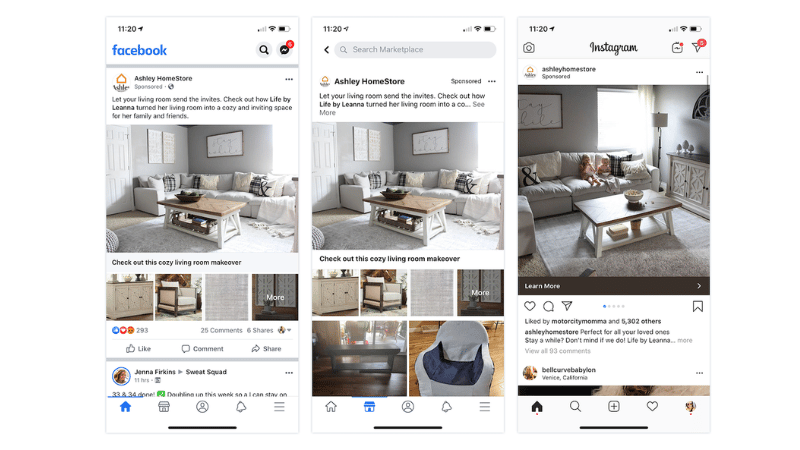
Facebook Marketplace only shows viewers three elements at the first point of contact: Image – Title – Price. Users do not see the description, detailed advantages, or whether you are a reputable seller yet.
In a few seconds of quick scrolling, they rely solely on these three factors to decide whether to stop, click on the post, read the remaining content, or send you a message. Therefore, optimizing these three elements is the foundation for increasing clicks and opening up opportunities to close deals.
The title must have at least 4 words
A common mistake on Marketplace is setting titles that are too short and overly generic. Titles such as “selling washing machine,” “selling bicycle,” or “kids’ bike” create almost no differentiation compared to hundreds of other listings.
When a title consists of only 2–3 words, you do not have enough space to convey critical information or provide a reason for viewers to stop.
A title of at least 4 words allows room to combine keywords, a brief description, and an attractive element. If you do not use the necessary number of words, you are making your title dull and easy to scroll past among countless similar posts.
Keep titles within a maximum limit of 7 words
Conversely, titles that are too long are also ineffective. When users scroll through Marketplace, Facebook only displays approximately the first 4–7 words; the subsequent words will be truncated. Therefore, writing a title 10–14 words long is a complete waste.
The most optimal range is between 4 and 7 words. This is the “golden zone” for placing your most important information. Writing longer does not make the title clearer; on the contrary, it dilutes the message. Viewers won’t grasp what you are selling, and a concise, meaningful, and easy-to-read title always yields a higher click-through rate.
Prioritize keywords matching search behavior
An effective title is not one you find appealing, but one that matches how customers search. Many sellers make the mistake of using brand names or technical terminology, while buyers search using very common phrases.
For example, a vegetable cutter product once advertised on TV had the brand name Ultra Blade. When titled “Ultra Blade vegetable cutter clearance price,” the views were negligible. However, when changed to phrases users actually searched for, such as “vegetable cutter on TV” or “green vegetable cutter,” views surged and the product sold out quickly.
Within the 4–7 word range of the title, use the keywords that customers type into the search bar, not the terms you are accustomed to using as a seller.
Combine keywords with power words
A title consisting only of keywords will be accurate but not necessarily engaging. To increase click-through rates, you need to add power words such as: offer, excellent, unique, can’t miss, best price, clearance.
These words directly target the emotions and curiosity of viewers. When scrolling through Marketplace, users are often attracted to titles suggesting they are about to miss out on a good opportunity. Combining keywords with power words will help your title stand out significantly compared to surrounding posts.
Leverage Facebook search suggestions
If you are unsure how customers find your product, let Facebook tell you. Simply go to Marketplace and type the product name into the search box; the system will automatically suggest popular phrases.
For example, when typing “electric oven,” you will see suggestions like: large electric oven, new electric oven, used electric oven, and cheap electric oven. This is actual user search behavior data. Your task is to select the most relevant phrases and include them in the title instead of guessing.
Frequently Asked Questions
This happens because you are using Advantage+ placements (automatic). Facebook’s algorithm will automatically distribute the budget to the Newsfeed or Instagram if the system perceives low traffic or high costs on Marketplace. To focus 100% on Marketplace, you must switch to Manual Placements and uncheck all other platforms.
Organic posts have a trust advantage, but paid ads have the advantage of frequency and priority placement. To avoid being “submerged,” use high-contrast images or prominent borders to distinguish your ad from personal photos. Additionally, responding to messages in under 5 minutes is vital; the Marketplace algorithm highly values response speed and prioritizes your ads in top positions accordingly.


